


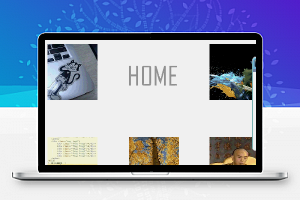

日常相册处理,细节至上,初级版
具体的截图,今天由于时间关系,不做详细描述若需要具体数据信息,或者了解更多小小艺人平台信息
可在网上搜索“艺人邦”,或者访问“http://www.300hu.com/”官网,下载APP,或者注册,即可获得相关接口,已经相应数据内容和用法
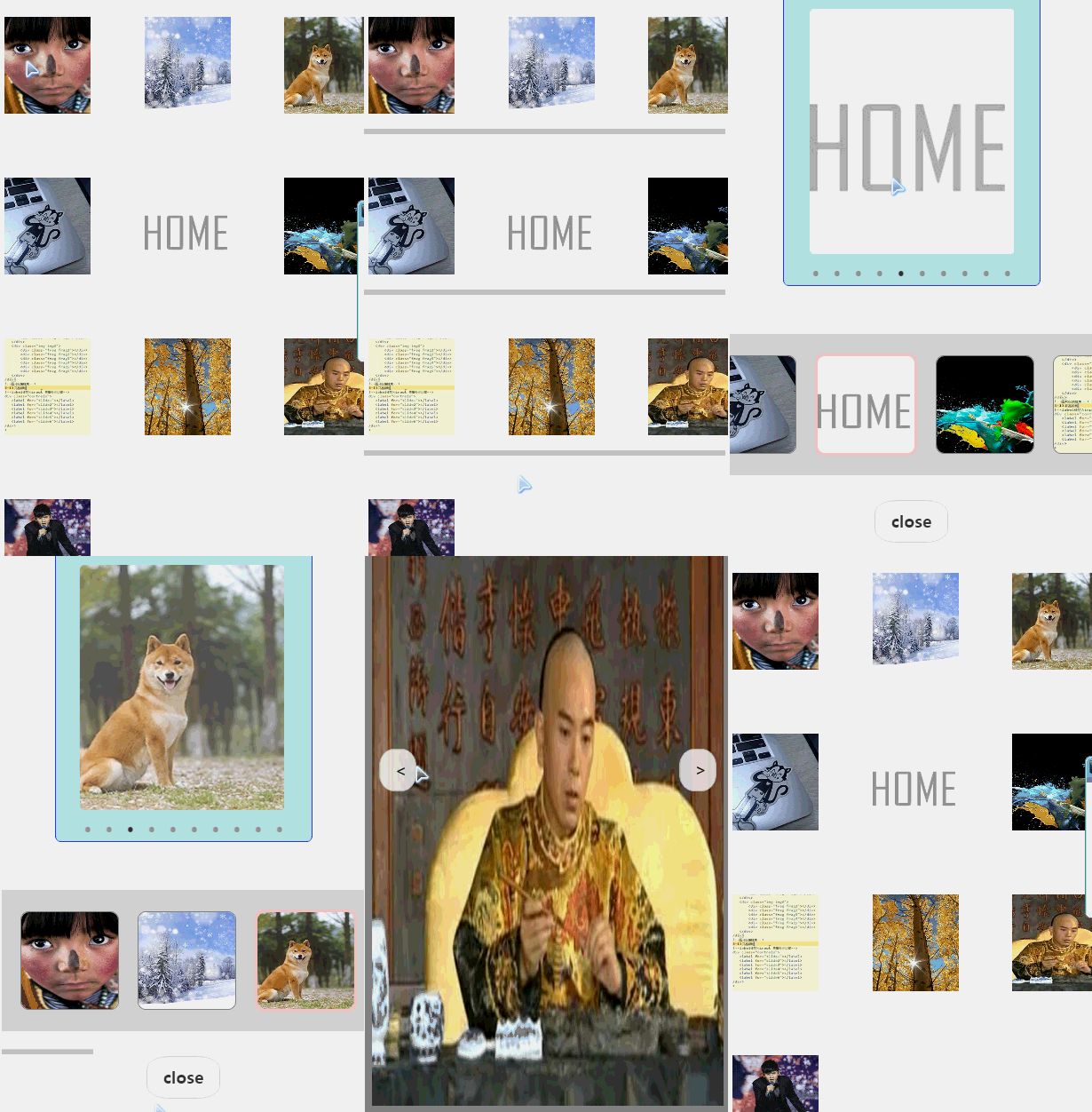
1.相册进入界面
列表样式显示图片
2.点击图片
进入高级画册
3.高级画册
可点选对应的图片,查看高品质图片,由于网络影响,速度可能会比较慢
大图,可以通过点击它显示左右切换功能,也可以手动滑动(一般会受网络影响)
同时,图片在3秒后可以点击close关闭
- var util = require(‘../../utils/util.js’)
- var cfg = require(‘../../utils/cfg.js’)
- Page({
- data: {
- album: {},
- show: true,
- pid: 0,
- cid: 0,
- savatar: ”,
- showGallery: true,
- showBtn: true,
- height: cfg.height,
- width: cfg.width,
- scale: cfg.height / cfg.width,
- img: cfg.img,
- imageWidth: cfg.width,
- imageHeight: cfg.height,
- time: 0,
- params: {
- client_ver: ‘0.4.4’,
- from_client: ‘cc’,
- openid: ”,
- page: 1,
- pagesize: 10,
- title: ”,
- uid: 1140518
- }
- },
- formSubmit: function (e) {
- var val = e.detail.value
- console.log(‘form发生了submit事件,携带数据为:’, val.input)
- var that = this
- var obj = that.data.params
- obj.title = val.input
- that.setData({ params: obj })
- setTimeout(function () {
- that.getConImages()
- }, 1000)
- },
- getConImages: function () {
- var that = this
- var obj = that.data.params
- console.log(‘album—params–name:’ + obj.username)
- util.get(cfg.host + ‘api/cc/act?mod=user3&act=photos’, obj,
- function (res) {
- obj = res.data
- obj = obj.data.list
- that.setData({
- album: obj,
- time: 0
- })
- })
- },
- showMadel(e) {
- console.log(‘showMadel:’ + e.currentTarget.id)
- var that = this
- that.setData({
- showGallery: false,
- cid: e.currentTarget.id
- })
- },
- showView(e) {
- var that = this
- var savatar = that.data.album[e.currentTarget.id].photo
- savatar = savatar.split(‘.jpg’)
- savatar = savatar[0] + ‘.jpg’
- var imageSize = util.imgUtil(savatar)
- that.setData({
- show: false,
- pid: e.currentTarget.id,
- savatar: savatar,
- imageWidth: imageSize.imageWidth,
- imageHeight: imageSize.imageHeight
- })
- },
- showBtns(e) {
- var that = this
- that.setData({showBtn: false})
- setTimeout(
- function() {
- if (!that.data.showBtn) {
- that.setData({showBtn: true})
- }
- }, 3000)
- },
- closeImg(e) {
- console.log(‘e:’ + e)
- console.log(‘closeImg:’ + e.currentTarget.id)
- var that = this
- // var pid = that.data.pid
- var show = that.data.show
- if (show) {
- // 当处于浏览状态时,点击关闭,隐藏浏览界面
- that.setData({showGallery: true})
- } else {
- // 当处于浏览状态时,点击关闭,隐藏浏览界面
- that.setData({show: true})
- }
- },
- nextImg(e) {
- // 点击时,获取当前图片ID,或者pid
- var that = this
- var id = that.data.cid
- var length = that.data.length
- var time = that.data.time
- if (id === (length – 2)) {
- if (time !== 1) {
- time = 1
- setTimeout(function () {
- that.getMoreImg()
- }, 1000)
- } else {
- return
- }
- wx.showToast({
- title: ‘更多,请等待加载’,
- icon: ‘successs’,
- duration: 2000
- })
- } else {
- that.setData({cid: id + 1, pid: id + 1})
- }
- },
- prevImg(e) {
- // 点击时,获取当前图片ID,或者pid
- var that = this
- var id = that.data.pid
- // var length = that.data.album.length
- if (id === 0) {
- wx.showToast({
- title: ‘这是第一张图片’,
- icon: ‘successs’,
- duration: 2000
- })
- return
- }
- that.setData({cid: id – 1, pid: id – 1})
- },
- changeId(e) {
- console.log(‘changeId:’ + e.detail.current)
- var that = this
- var id = e.detail.current
- var time = that.data.time
- if (id >= that.data.album.length – 2) {
- wx.showToast({
- title: ‘更多,请等待加载’,
- icon: ‘successs’,
- duration: 2000
- })
- if (time !== 1) {
- time = 1
- setTimeout(function () {
- that.getMoreImg()
- }, 1000)
- } else {
- id = id – 1
- }
- }
- var show = that.data.show
- var savatar = that.data.album[id].photo
- if (!show) {
- savatar = savatar.split(‘.jpg’)
- savatar = savatar[0] + ‘.jpg’
- }
- that.setData({
- cid: id,
- pid: id,
- savatar: savatar
- })
- },
- bindCid(e) {
- console.log(‘closeView:’ + e.currentTarget.id)
- var that = this
- that.setData({cid: e.currentTarget.id})
- },
- scrollEvent: function (e) {
- var that = this
- setTimeout(function () {
- that.getMoreImg()
- }, 1000)
- },
- getMoreImg: function () {
- var that = this
- var obj = that.data.params
- var album = that.data.album
- if (album.length === obj.pagesize) {
- obj.pagesize += 10
- that.setData({
- params: obj
- })
- }
- setTimeout(function () {
- that.getConImages()
- }, 1000)
- },
- onLoad: function () {
- var that = this
- var width = cfg.width
- var height = cfg.height
- console.log(‘width:’ + width + ‘height:’ + height)
- var scale = height / width
- that.setData({
- width: width,
- height: height,
- scale: scale
- })
- setTimeout(function () {
- that.getConImages()
- }, 1000)
- }
- })
- // # sourceMappingURL=album.js.map
复制代码
- <scroll-view scroll-y=”true” hidden=”{{!showGallery}}”style=”height:{{(album.length)*100}}rpx;background-color:lightcyan;position:relative;top:125rpx;”
- >
- <form bindsubmit=”formSubmit” class = “firstbox”>
- <view class = “srft”>
- <input name=”input” style=”background-color:gray;margin-top:-21rpx;margin-left:80rpx;width:330rpx;border:2rpx solid yellow;border-radius:8%” />
- <button formType=”submit” style=”color:blue;margin-top:-21rpx;font-size:21rpx;height:60rpx;margin-left:100rpx;text-align:top;”>搜索</button>
- </view>
- </form>
- <view class=”params” wx:for=”{{album}}”
- wx:key=”photo”
- wx:if=”{{(index%3==0)}}”>
- <view
- style=”margin-left:40rpx;”
- bindtap=”showMadel” id=”{{index}}”>
- <image
- class=”userinfo-avatar”
- src=”{{img+album[index].photo}}”
- ></image> </view>
- <view
- style=”margin-left:10rpx;margin-right:10rpx;”
- bindtap=”showMadel”
- id=”{{index+1}}”>
- <image
- class=”userinfo-avatar”
- src=”{{img+album[index+1].photo}}”
- ></image>
- </view>
- <view
- style=”margin-right:40rpx;”
- bindtap=”showMadel”
- id=”{{index+2}}”>
- <image
- class=”userinfo-avatar”
- src=”{{img+album[index+2].photo}}”
- ></image>
- </view>
- </view>
- </scroll-view>
- <view hidden=”{{showGallery}}”style=”position:absolute;top:0rpx;left:0rpx;width:100%;height:100%;z-index:1;background:linear-gradient(to bottom, lightblue , lightgray);opacity:0.6;”>
- </view>
- <view hidden=”{{showGallery}}” style=”position:absolute;top:0rpx;left:0rpx;width:100%;height:100%;z-index:2;”>
- <swiper indicator-dots=”true” current=”{{cid}}” bindchange=”changeId”
- autoplay=”false” interval=”60000″ duration=”400″ circular=”false” style=”width:{{(show)?70:90}}%;height:{{(show)?50:90}}%;position:absolute;top:5%;left:{{(show)?15:5}}%;border-top: 3rpx solid lightgray;border-bottom: 4rpx solid gray;border-right:3rpx solid gray;border-left:2rpx solid lightgray;border-radius:2%;opacity:{{(show)?0.9:0}};background-color:aliceblue;z-index:{{(show)?3:5}}” >
- <block wx:for=”{{album}}” wx:key=”photo”>
- <swiper-item id=”{{index}}” bindtap=”{{(show)?’showView’:’showBtns’}}” >
- <image
- src=”{{img+album[index].photo}}” style =”width:{{(show)?80:100}}%;height:{{(show)?80:100}}%;position:relative;top:{{(show)?10:0}}%;left:{{(show)?10:0}}%;”/>
- </swiper-item>
- </block>
- </swiper>
- <scroll-view scroll-x=”true” bindscrolltolower=”scrollEvent” style=”position:absolute;top:60%;left:0rpx;width:100%;height:30%;” lower-threshold =”10rpx” scroll-left=”{{(cid>2)?(cid*130):0}}” >
- <view class=”box3″ style = “width:{{(album.length)*240}}rpx;” >
- <view wx:for=”{{album}}” wx:key=”photo” >
- <view bindtap=”bindCid” id=”{{index}}”
- style =”display:flex;flex-direction:row;align-items:center;margin-left:40rpx;border-radius:8%;border:{{(index == cid)?’6rpx solid pink’:’3rpx solid gray’}}”
- >
- <image class=”userinfo-avatar” src=”{{img+album[index].photo}}”></image>
- </view >
- </view >
- </view >
- </scroll-view >
- <view bindtap=”showBtns” hidden=”{{show}}” style=”position:absolute;top:0%;left:0%;width:100%;height:100%;z-index:3;background-color:black;opacity:0.6;”>
- </view>
- <!–<image bindtap=”showBtns” hidden=”{{show}}” id =”{{pid}}” src=”{{img+savatar}}” style =”width:{{imageWidth}}px;height:{{imageHeight}}px;position:absolute;left:{{(imageWidth==width)?0:(width-imageWidth)/2}}px;top:{{(imageHeight==height)?0:(height-imageHeight)/2}}px;z-index:4;”/>–>
- <image bindtap=”showBtns” hidden=”{{show}}” id =”{{pid}}” src=”{{img+savatar}}” style =”width:90%;height:80%;position:absolute;left:5%;top:10%;z-index:4;”/>
- <view hidden=”{{showBtn}}”>
- <button bindtap=”prevImg” style=”position:absolute;top:40%;left:4%;width:10%;height:7%;background-color:white;z-index:6;opacity:0.8;border-radius:40%;color:black;border:1rpx solid lightgray;font-weight:bold;” >
- <--
- </button>
- <button bindtap=”nextImg” style=”position:absolute;top:40%;right:4%;width:10%;height:7%;background-color:white;z-index:6;opacity:0.8;border-radius:40%;color:black;border:1rpx solid lightgray;font-weight:bold;” >
- >--
- </button>
- </view>
- <button bindtap=”closeImg” hidden=”{{!showBtn}}” style=”position:absolute;top:90%;left:39.9%;width:20%;height:7%;background-color:white;z-index:6;opacity:0.8;border-radius:30%;color:black;border:1rpx solid lightgray;font-weight:600;” >
- close
- </button>
- </view>
复制代码
免责声明:本站所有文章和图片均来自用户分享和网络收集,文章和图片版权归原作者及原出处所有,仅供学习与参考,请勿用于商业用途,如果损害了您的权利,请联系网站客服处理。